korelate
Korelate helps businesses make sense of the vast amounts of data coming from their factories and industrial equipment. It organizes this data into a clear, structured system, like a family tree for all your machines and sensors, so everyone understands what information is available. This solves the problem of data being scattered across different systems and hard to interpret, preventing delays and errors in decision-making. Operations managers, engineers, and data analysts would find Korelate particularly useful for monitoring performance, identifying issues, and improving efficiency. What sets it apart is its ability to automatically analyze data, find the root causes of problems, and generate reports, all without needing extensive manual intervention.
README
# Korelate
<div align="center">




**The Open-Source Unified Namespace Explorer for the AI Era**
[Live Demo](https://www.mqttunsviewer.com) • [Architecture](#-architecture--design) • [Installation](#-installation--deployment) • [User Manual / Wiki](#-user-manual--power-user-wiki) • [Developer Guide](#-developer-guide) • [API](#-api-reference)
</div>
---
### 📺 Watch the Demo
[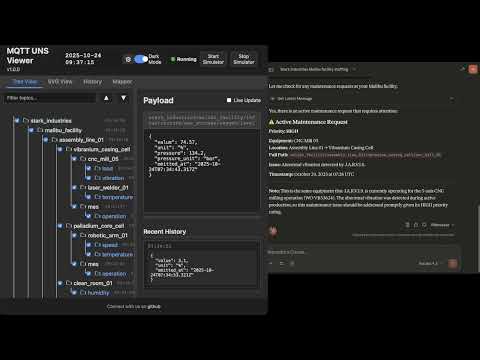](https://youtu.be/aOudy4su9F0)
---
## 📖 The Vision: Why UNS? Why Now?
### The Unified Namespace (UNS) Concept
The **Unified Namespace** is the single source of truth for your industrial data. It creates a semantic hierarchy (e.g., `Enterprise/Site/Area/Line/Cell`) where every smart device, software, and sensor publishes its state in real-time.
* **Single Source of Truth:** No more point-to-point spaghetti integrations.
* **Event-Driven:** Real-time data flows instead of batch processing.
* **Open Architecture:** Based on lightweight, open standards (MQTT, Sparkplug B).
> 📚 **Learn More:**
> * [What is UNS? (HiveMQ Blog)](https://www.hivemq.com/blog/unified-namespace-iiot-architecture/)
> * [Walker Reynolds on UNS (YouTube)](https://www.youtube.com/watch?v=6xHpw9YBYIQ)
### The AI Revolution & Gradual Adoption
In the age of **Generative AI** and **Large Language Models (LLMs)**, context is king. An AI cannot optimize a factory if the data is locked in silos with obscure names like `PLC_1_Tag_404`.
**Korelate** facilitates **Gradual Adoption**:
1. **Connect** to your existing messy brokers.
2. **Visualize** the chaos.
3. **Structure** it using the built-in **Mapper (ETL)** to normalize data into a clean UNS structure without changing the PLC code.
4. **Analyze** with the **Autonomous AI Agent** which monitors alerts, investigates root causes using available tools, and generates reports automatically.
---
## 🏗 Architecture & Design
This application is designed for **Edge Deployment** (on-premise servers, industrial PCs). It prioritizes low latency, low footprint, high versatility, and extreme resilience against data storms.
### Component Diagram
```mermaid
graph TD
subgraph FactoryFloor ["Factory Floor"]
PLC["PLCs / Sensors"] -->|MQTT/Sparkplug| Broker1["Local Broker"]
Cloud["AWS IoT / Azure"] -->|MQTTS| Broker2["Cloud Broker"]
CSV["Legacy Systems"] -->|CSV Streams| FileParser["Data Parsers"]
end
subgraph UNSViewer ["Korelate (Docker)"]
Backend["Node.js Server"]
DuckDB[("DuckDB Hot Storage")]
Mapper["ETL Engine V8"]
Alerts["Alert Manager & AI Agent"]
MCP["MCP Server (External AI Gateway)"]
Backend <-->|Subscribe| Broker1
Backend <-->|Subscribe| Broker2
Backend <-->|Loopback Stream| FileParser
Backend -->|Write| DuckDB
Backend <-->|Execute| Mapper
Backend <-->|Orchestrate| Alerts
MCP <-->|Context Query| Backend
end
subgraph PerennialStorage ["Perennial Storage"]
Timescale[("TimescaleDB / PostgreSQL")]
end
subgraph Users ["Users"]
Browser["Web Browser"] <-->|WebSocket/HTTP| Backend
Claude["Claude / ChatGPT"] <-->|HTTP/SSE| MCP
end
Backend -.-+>|Async Write| Timescale
```
### Storage & Resilience Strategy
To handle environments ranging from a few updates a minute to thousands of messages per second, the architecture uses a multi-tiered and highly resilient approach:
1. **Extreme Resilience Layer (Anti-Spam & Backpressure):**
* **Smart Namespace Rate Limiting:** Drops high-frequency spam (>50 msgs/s per namespace) early at the MQTT handler level, protecting CPU/RAM while preserving low-frequency critical events.
* **Queue Compaction:** Deduplicates topic states in memory before DuckDB insertion to prevent Out-Of-Memory (OOM) errors during packet storms.
* **Frontend Backpressure:** Uses `requestAnimationFrame` to batch DOM updates, ensuring the browser UI never freezes, even under extreme load.
2. **Tier 1: In-Memory (Real-Time):** Instant WebSocket broadcasting for live dashboards.
3. **Tier 2: Embedded OLAP (DuckDB):** * Stores "Hot Data" locally.
* Time-series aggregations via native `time_bucket` functions.
* Auto-pruning prevents disk overflow (`DUCKDB_MAX_SIZE_MB`).
4. **Tier 3: Perennial (TimescaleDB):**
* Optional connector.
* "Fire-and-forget" batched ingestion for long-term archival and compliance.
---
## 🐳 Installation & Deployment
### Prerequisites
* Docker & Docker Compose
* Access to MQTT Broker(s), OPC UA server(s), or local CSV files
### 1. Quick Start
```bash
# Clone the repository
git clone https://github.com/slalaure/korelate.git
cd korelate
# Setup configuration
cp .env.example .env
# Start the stack (Multi-Arch image available on Docker Hub)
docker-compose up -d
```
* **Dashboard:** `http://localhost:8080`
* **MCP Endpoint:** `http://localhost:3000/mcp`
### 2. Configuration (`.env`)
The application supports extensive configuration via environment variables.
#### Connectivity & Permissions
Define multiple providers and explicitly set their Read/Write permissions using arrays. Supported types are `mqtt`, `opcua`, and `file`.
```bash
# Define multiple providers (Minified JSON)
DATA_PROVIDERS='[{"id":"local_mqtt", "type":"mqtt", "host":"localhost", "port":1883, "subscribe":["#"], "publish":["uns/commands/#"]}, {"id":"factory_opc", "type":"opcua", "endpointUrl":"opc.tcp://localhost:4840", "subscribe":[{"nodeId":"ns=1;s=Temperature", "topic":"uns/factory/temperature"}]}]'
```
#### Storage Tuning
```bash
DUCKDB_MAX_SIZE_MB=500 # Limit local DB size. Oldest data is pruned automatically.
DUCKDB_PRUNE_CHUNK_SIZE=5000 # Number of rows to delete per prune cycle.
DB_INSERT_BATCH_SIZE=5000 # Messages buffered in RAM before DB write (Higher = Better Perf).
DB_BATCH_INTERVAL_MS=2000 # Flush interval for DB writes.
# Perennial Storage (Optional)
PERENNIAL_DRIVER=timescale # Enable long-term storage (Options: 'none', 'timescale')
PG_HOST=192.168.1.50 # Postgres connection details
PG_DATABASE=korelate
PG_TABLE_NAME=mqtt_events
```
#### Authentication & Security
```bash
# Web Interface & API Authentication
HTTP_USER=admin # Basic Auth User (Legacy/API fallback)
HTTP_PASSWORD=secure # Basic Auth Password
SESSION_SECRET=change_me # Signing key for session cookies
# Google OAuth (Optional)
GOOGLE_CLIENT_ID=...
GOOGLE_CLIENT_SECRET=...
PUBLIC_URL=http://localhost:8080 # Required for OAuth redirects
# Auto-Provisioning
ADMIN_USERNAME=admin # Creates/Updates a Super Admin on startup
ADMIN_PASSWORD=admin
```
#### AI & MCP Capabilities
Control what the AI Agent is allowed to do.
```bash
MCP_API_KEY=sk-my-secret-key # Secure the MCP endpoint
LLM_API_URL=... # OpenAI-compatible endpoint (Gemini, ChatGPT, Local)
LLM_API_KEY=... # Key for the internal Chat Assistant
# Granular Tool Permissions (true/false)
LLM_TOOL_ENABLE_READ=true # Inspect DB, topics list, history, and search
LLM_TOOL_ENABLE_SEMANTIC=true # Infer Schema, Model Definitions
LLM_TOOL_ENABLE_PUBLISH=true # Publish MQTT messages
LLM_TOOL_ENABLE_FILES=true # Read/Write files (SVGs, 3D Models, Simulators)
LLM_TOOL_ENABLE_SIMULATOR=true # Start/Stop built-in sims
LLM_TOOL_ENABLE_MAPPER=true # Modify ETL rules
LLM_TOOL_ENABLE_ADMIN=true # Prune History, Restart Server
```
#### Analytics
```bash
ANALYTICS_ENABLED=false # Enable Microsoft Clarity tracking
```
---
## 📘 User Manual / Power User Wiki
### 1. Authentication,
[truncated…]PUBLIC HISTORY
IDENTITY
Identity inferred from code signals. No PROVENANCE.yml found.
Is this yours? Claim it →METADATA
README BADGE
Add to your README:
